The Strategic Value of a Unified Education and Learning Icon Set
In the visual landscape of digital communication, icons are not mere decoration. They are a fundamental part of the user interface, acting as silent guides that direct attention, clarify function, and establish brand cohesion. For projects centered on knowledge, instruction, or intellectual growth, having a dedicated, coherent set of Education and Learning Icons is a strategic design decision. The specific value of a line style set, built on a disciplined 64×64 grid size, lies in its marriage of aesthetic simplicity with practical flexibility, making it an indispensable asset for modern creators.
The Rise of Clean, Scalable Visual Systems
Current trends in digital design overwhelmingly favor clarity and speed of comprehension. Users, overwhelmed by information, expect interfaces to be intuitive and uncluttered. This has led to a pronounced preference for simple and clean icon design. A line style approach, using strokes to create forms rather than filled shapes, inherently carries a lighter, more modern feel. It conveys concepts without visual weight, which is crucial for maintaining clean layouts in web projects, mobile apps, and social media posts.
Furthermore, the move towards responsive design across countless screen sizes and resolutions demands assets that scale flawlessly. A set built on a 64px grid size provides this foundational structure. Each icon is designed within this consistent bounding box, ensuring visual harmony when icons are used together. The grid is a invisible skeleton guaranteeing that whether an icon is displayed at 16px on a mobile menu or 128px on a promotional infographic, its proportions and alignment remain perfect.
Beyond the Pixel: The Power of Vector Format
The true evolution in digital asset utility is the shift from static, bitmap images to dynamic, vector-based graphics. The feature list of 100 Vector icons is not just a count; it represents a fundamental change in how designers and content creators work. Vector files (like the included AI, EPS 10, and SVG) are mathematical descriptions of shapes, not grids of pixels. This means they are fundamentally customizable and easy to edit.
Practical implications are significant. A brand manager can instantly change the entire set’s color to match a new campaign palette without losing quality. A web developer can resize an SVG icon infinitely without encountering blurry edges. For the entrepreneur or educator building their own materials, this flexibility removes a major technical barrier. The inclusion of both Live Stroke (non-expanded) and Expanded Stroke versions offers further control. Live Stroke allows for easy adjustment of line thickness within Illustrator, while Expanded Stroke converts the lines to shapes for more complex manipulations or compatibility.
Adapting to Context: Color and File Format Versatility
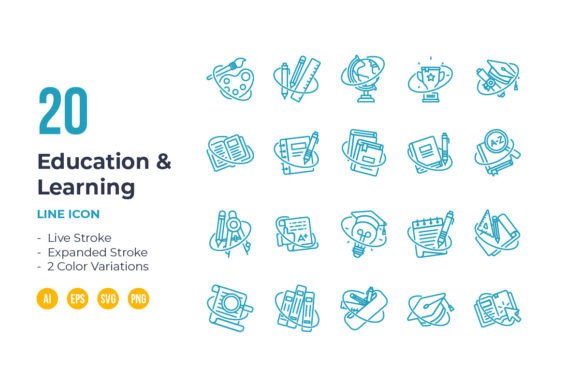
The provision of 2 color variations—blue and black—addresses a common real-world need. Blue, often associated with trust, intelligence, and calm, is a natural fit for educational and corporate learning contexts. Black offers maximum neutrality and contrast, ideal for integrating into existing designs with strong color schemes. Starting with these two options saves time, but the vector nature means creating a third, fourth, or fifth variation is a matter of seconds, not hours.
The curated files included—Source AI, EPS 10, SVG, and PNG Transparent—serve specific roles in a professional workflow. The AI file is the master source for deep editing in Adobe Illustrator. EPS ensures compatibility with older print and design systems. SVG is the gold standard for modern web development, enabling crisp display and potential animation. PNG files provide a ready-to-use, transparent-background format for quick placement in social media graphics, presentation slides, or documents where vector editing isn’t required. This multi-format approach ensures the asset is useful across the entire project lifecycle, from conception in a creative suite to implementation on a live website.
Integrating Icons into Modern Creative Workflows
For the professional, freelancer, or hobbyist, time is the most constrained resource. The note that to resize, change color, or edit stroke weight, you can easily edit on vector software highlights workflow efficiency. It turns a static asset into a dynamic tool. Consider an instructional designer creating an online course module. They can use the SVG icons directly in their web-based platform, ensuring clarity on all devices. A marketing professional preparing an infographic about a company’s training programs can open the AI file, recolor the icons to the brand’s exact orange, and export them at the exact size needed, all within minutes.
This set fits seamlessly into the trend of asset-based design, where high-quality, modular components are assembled to produce consistent visual communication rapidly. It supports the needs of businesses building internal learning portals, educators developing digital curricula, bloggers illustrating complex concepts, and app developers creating intuitive user interfaces for educational tools. The unified style across 100 icons—covering likely concepts from books and graduation caps to brains, graphs, and collaboration symbols—means a single project can have a complete visual language without the fragmentation of sourcing icons from disparate, stylistically inconsistent sets.
A Foundational Element for Clear Communication
Ultimately, the relevance of a dedicated Education and Learning Icon set lies in its function as a foundational element for clear communication. In a world where attention is scarce, visual cues must be instantly recognizable. A clean, grid-based line icon set reduces cognitive load for the end-user. It allows the creator to focus on message and content, not on solving visual cohesion problems. The technical specifications—the grid, the vector formats, the stroke options—are not just features; they are the engineering that makes this visual simplicity and professional adaptability possible. By investing in such a system, creators equip themselves not with a single set of images, but with a versatile, scalable visual toolset ready to meet the evolving demands of digital education and communication.