Evaluating the Graphic Design Icon Set Bundle
The selection of visual assets is a critical step in any design project. Among these assets, icon sets serve as foundational tools for communication and user interface enhancement. A Graphic Design Icon Set bundle, as described, typically offers a curated collection of symbols in a specific style—in this case, an outline style—packaged with multiple file formats for broad application. Such bundles are designed to provide designers with ready-made, cohesive elements to accelerate workflows.
Core Features and Practical Applications
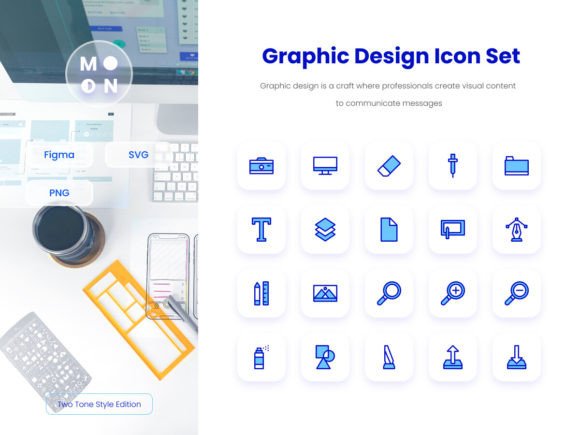
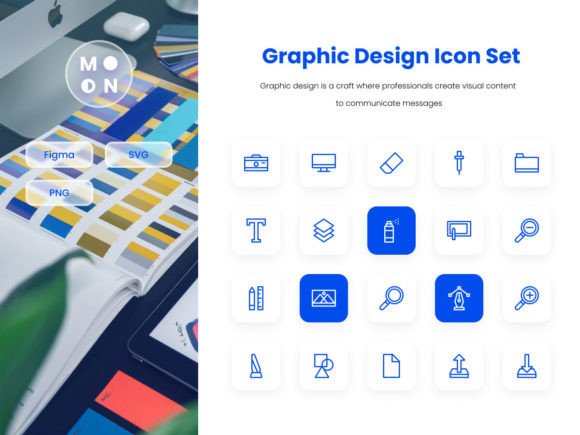
The bundle outlined includes 20 icons characterized by an outline design style. This style is often chosen for its clarity and modern aesthetic, which can integrate smoothly into various digital and print contexts. The listed applications are extensive, covering user interfaces, infographics, websites, mobile applications, social media graphics, presentations, and physical print media like flyers and posters.
The technical features highlight several key points for professional use. "High-Quality Icon Design" and "Perfect Pixel" suggest attention to visual fidelity and sharpness at standard resolutions. The inclusion of "100 Vector Customizable" files, such as SVG, is particularly significant. Vector graphics are mathematically defined, allowing them to be scaled to any size without loss of quality, which is essential for responsive design where an icon might appear on both a mobile screen and a large desktop monitor.
Editable shape and the ease of changing color, size, and employing drag-and-drop functionality speak to flexibility. For designers working within software like Figma, Adobe Illustrator, or even presentation tools, these characteristics mean the icons can be adapted to match specific brand color palettes or layout requirements without needing to recreate them from scratch. The provided file formats—SVG for scalability and web use, PNG with transparency for raster-based applications, and a dedicated FIGMA file—aim to reduce technical barriers across different platforms and tools.
Potential Benefits and Value Considerations
For an individual designer, a freelancer, or a small team, the primary benefit of a pre-made Graphic Design Icon Set is time efficiency. Designing 20 cohesive, professional-grade icons from scratch requires considerable effort. A bundle can offer a jumpstart, allowing the designer to focus on broader layout, user experience, or content strategy.
Consistency is another major advantage. All icons within a set share a common visual language—line weight, corner treatment, and overall complexity. This internal consistency helps create a polished, unified look across an entire project, which is crucial for professional credibility and user trust.
However, tradeoffs exist. The scope is fixed at 20 icons. While this may cover many common needs like email, print, save, or user account symbols, a complex project might require more niche or specific icons not included in the set. In such cases, the designer must either supplement the bundle with another set or custom icons, which can affect visual cohesion. Furthermore, while "outline style" is versatile, it may not suit every brand personality. A brand requiring a filled, flat, or highly detailed illustrative style might find this set a mismatch.
Situations Where This Bundle Is a Strong Fit
This Graphic Design Icon Set bundle is likely a strong fit in several scenarios. For rapid prototyping, whether for a website, app mockup, or presentation deck, having a set of editable icons can speed up the visualization of ideas. Small businesses or startups developing their initial digital presence (a website, social media banners, and a presentation for investors) may find a compact set like this cost-effective and sufficient for early needs.
Designers or marketers who frequently produce content across multiple formats—such as blog graphics, social posts, and internal presentations—will benefit from the multi-format files. The SVG and PNG files cater to both web developers and graphic designers. The inclusion of a FIGMA file directly serves the growing community of designers using that collaborative interface design tool.
Projects with a clear, modern, and minimalist aesthetic are a natural fit for an outline icon style. The style tends to be less visually dominant than filled icons, allowing it to complement typography and imagery without overwhelming them.
When to Consider Alternatives
Alternatives should be explored if the project requirements extend beyond the offerings of this specific Graphic Design Icon Set. If the project demands a much larger library of icons—for instance, a comprehensive e-commerce site with numerous product categories and user actions—a more extensive icon library or a subscription to an ongoing icon service might be more practical.
Similarly, if the brand's visual identity is already firmly established with a specific icon style that contradicts the outline approach, custom-designed icons or a search for a set that matches the existing style would be preferable. Strict brand guidelines often dictate icon weight, color usage, and level of detail.
For projects with extremely limited budgets where only a few icons are needed, free icon resources might be a viable alternative, though often with tradeoffs in consistency, license clarity, or file format availability. Conversely, for large-scale, long-term projects like a suite of enterprise software applications, investing in a custom icon set designed exclusively for the brand might offer better long-term value and uniqueness despite higher initial cost.
Practical Decision-Making Insights
When evaluating this or any similar Graphic Design Icon Set, align the assessment with your specific project goals and constraints. First, audit the actual icons provided. Do the 20 symbols cover the core actions and concepts you need to communicate? Second, review the technical requirements. Ensure your primary design tools support and work efficiently with the provided file formats (SVG, FIGMA). Third, consider the licensing terms, which are often included separately from feature lists. Confirm the bundle allows for commercial use in the types of projects you intend.
Finally, think about the lifecycle of your project. Is it a one-off presentation or a website that will evolve and grow over years? For evolving projects, the scalability of the set—both in terms of visual style accommodating future additions and the practicality of editing vectors—becomes more critical. A well-constructed Graphic Design Icon Set can serve as a reliable, adaptable resource, but its value is ultimately determined by how closely it matches the functional needs and visual direction of your work.